
Website Analytics: Track Visitors, Improve Your Sales
See how many people visit, when they come and which device they use, right from your phone. Set up automatically, with nothing to install.

Know Your Visitors. Win More of Them.
Every visitor is someone interested enough to look. Your website is on Google and ChatGPT, and enquiries are coming in. But for every person who calls or fills a form, others look around and leave. Website analytics shows you when they come, which device they use and where they are from, so you can turn more of them into customers.
You want to know why some visitors enquire and others don’t. But visitor data usually sits in tools made for analysts, with code to add and reports to decode on a laptop. So changes to your website end up being made on a random guess.
Open Weaver tracks your visitors for you, from the day your website goes live. Real-time analytics is built in and set up automatically, so you can see sessions, unique visitors, devices, browsers and locations from your phone. Spot your busy days and see whether customers come on mobile or desktop. See how your visitors increase after your latest social media post, and sharpen your message to convert more of them. Use the free Social Media Marketing tool to make engaging posts and grow visitors. Export detailed logs anytime, or connect Google Analytics and Facebook analytics for deeper insight. All free with your website.
Set up is automatic
Website visitor tracking starts the day you go live. No code to add and nothing to configure.
Track on your phone
Check how many people visit your website, when they come and on which device, in real time.
Go deeper anytime
Export detailed logs, or connect Google Analytics and Facebook analytics in a few taps.
How it works
- 01
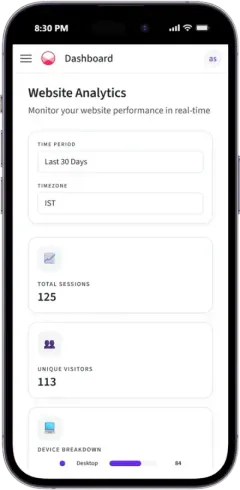
See your visitors at a glance
Total sessions and unique visitors for any time period, in your own timezone.
- 02
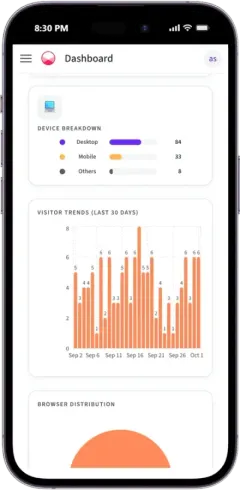
Spot trends and devices
Visitor trends for the period you choose, with a breakdown by device and browser.
- 03
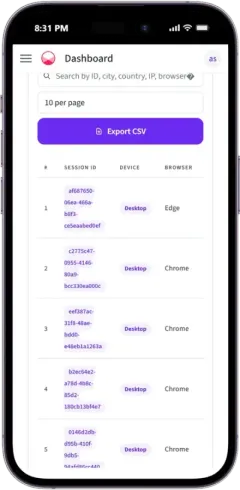
Dig into every visit
Search visits by city, country, device or browser, and export the full log as a CSV file.
- 04
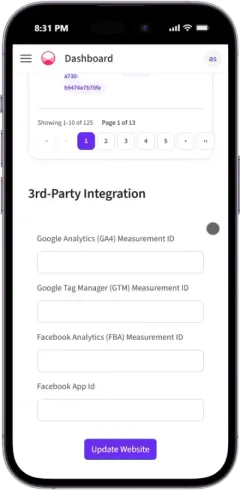
Connect Google and Facebook
Add your Google Analytics, Tag Manager or Facebook IDs, then tap Update Website.

6,500+ Businesses
450+ Cities, 100+ business types
Converting every visitor is critical to my destination wedding business, and the integrated analytics gives me a clear view.
Everything included with your website
Website Analytics is one part. Here is everything else that comes with it.
Website
Leads & Marketing
FAQs
How can I see how many people visit my website?
Open Website Analytics in your dashboard. It shows total sessions, unique visitors and daily trends for the time period you choose.
Do I need to set up website analytics?
No. Analytics is built into every Open Weaver website and starts working the day it goes live.
Can I use Google Analytics with my website?
Yes. Add your Google Analytics (GA4) Measurement ID or Google Tag Manager ID in Website Analytics and tap Update Website. You can add your Facebook IDs the same way.
Can I export my visitor data?
Yes. Export detailed visit logs as a CSV file for further analysis.
How does website analytics help me get more customers?
It shows when visitors come, which devices they use and where they are from. Use that to sharpen your message, plan offers for your busy days and make sure your website works well where your customers are. It also shows how your visitors increase after each social media post, so you know which posts bring customers.
See Before You Pay
- Enter details and see 6 free custom websites
- Select and pay only if you like it
- Free support
- 7-day risk-free trial