
Multi-language Website: Choose Any 6 Languages
Talk to customers in their own language, in your town or across the world. Easy to set up in one click.
Grow Hyperlocal. Grow Global.
Around the world, 76% of online shoppers prefer to buy when product information is in their own language. Your customers may speak Hindi, Gujarati, Tamil, Telugu or Bengali. Or you may export, or run tours for visitors who read German, French, Chinese or Spanish. A multi-language website lets each of them read about you in the language they think in.
You want every customer to feel welcome, not just those who read English. But translating a website well into several languages is real work: finding translators you trust, checking the meaning comes through, and doing it all again each time a price or service changes.
Open Weaver translates your website for you, free. Choose from Indian and global languages, and switch translation on with one click. Visitors pick their language from a menu at the top, and your headings, text and buttons change to match. Add or remove languages anytime from your dashboard, and win customers next door and across the world.
Indian and global languages
A website in Hindi, Tamil, Telugu, Gujarati or Bengali. Or in French, German, Chinese and Spanish.
Translated for you
No translators to hire and nothing to copy and paste. AI translates your content automatically.
One click to set up
Switch it on, pick your languages and you're done. Change them anytime from your dashboard.
How it works
- 01
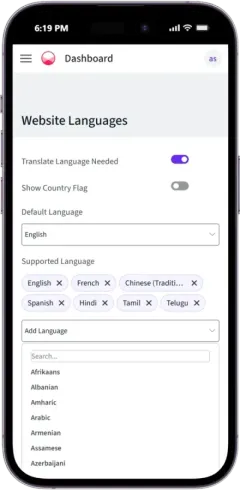
Switch on and add languages
A multilingual website builder in one switch. Turn on translation, then add the languages your customers speak.
- 02
Visitors pick their language
A language menu appears at the top of your website. Visitors tap it and choose theirs.

- 03
Everything changes to match
Headings, text and buttons all appear in the chosen language, straight away.


6,500+ Businesses
450+ Cities, 100+ business types
Launching a global career company was a breeze with instant translation to our key markets.
Everything included with your website
Multi-language Website is one part. Here is everything else that comes with it.
Website
FAQs
How do I make my website in Hindi or Tamil?
Go to Website Languages in your dashboard, switch on translation and add Hindi, Tamil or any language you need. Your website is translated automatically.
Which languages can I choose?
All Indian and global languages are available for free. Choose any 6 for your website. It is updated automatically.
Is the translation free?
Yes. AI translation is free with your Open Weaver website. There are no translators to pay.
How do visitors change the language?
They tap the language menu at the top of your website and pick theirs. You can also show a country flag beside each language.
Can I change my languages later?
Yes. Add or remove languages anytime from Website Languages in your dashboard.
See Before You Pay
- Enter details and see 6 free custom websites
- Select and pay only if you like it
- Free support
- 7-day risk-free trial